
Shopify: Sell. Run a business.
Shopify Inc.Business
4.25.08K Reviews
- Version
- 11.2645.0
- Installs
- 10.00M
- Age Rating
- Everyone
Screenshots


Our Review of Shopify: Sell. Run a business.
 Analysis by Appyee
Running a small shop often means solving the same problem repeatedly: products, orders, customers, stock, and marketing are scattered across different tools. I have found that Shopify: Sell online/in person is most useful when the goal is to bring those jobs into one working routine instead of constantly switching between spreadsheets, social platforms, and separate checkout systems. It is a business app from Shopify Inc., and it is free to install, although building a complete store can involve decisions and costs outside the app itself.
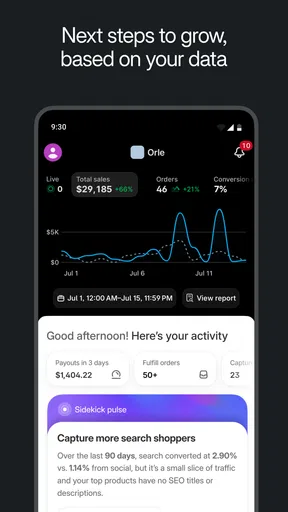
My experience with it is less about creating a pretty storefront in a few taps and more about reducing the daily mental load of selling. The app gives a shop owner a mobile control panel for the business: I can check what needs attention, review orders, adjust products, and keep an eye on activity without being tied to a desktop. That makes it especially appealing to people who sell from home, at markets, through a growing online shop, or across both online and in-person channels.
It is also a mature product rather than a new experiment. The app was released in late 2014, has passed ten million installs, and holds an average rating of 4.2 from roughly seventy-one thousand ratings. Those figures do not guarantee a perfect experience, but they do suggest that Shopify has become a familiar option for independent sellers and small teams.
Why the app is useful when selling becomes messy
The recurring difficulty for a growing seller is not always finding customers. It is remembering what happened after a sale. A customer may order online while another buys at a weekend event. One product may need a new photo, another may be nearly out of stock, and a third may have a description that no longer matches what is actually available. When those details live in different places, small mistakes become expensive in time and trust.
This is where Shopify feels different from a simple marketplace app or a basic card-payment tool. It is designed around the shop itself, not just one transaction. I can think about products, orders, customers, and the storefront as connected parts of the same operation. That connection is the main reason I would recommend trying it before collecting a pile of separate business apps.
The app is not only for people with a large catalogue. A maker with a handful of products can use it as a central home for online selling, while a more established retailer can use it to stay mobile during busy periods. The important distinction is that it works best when you want to manage a real shop rather than simply list an item and wait for a marketplace to handle the rest.
There is a trade-off, though. A broad business platform naturally asks for more setup than a casual selling app. If you only sell occasionally and do not need a dedicated store, Shopify may feel like more system than you need. Its value becomes clearer when repeated tasks are costing you time every week.
The first setup should be treated as a working process
The quickest way to get frustrated is to treat setup as decoration. Choosing a theme or adding a logo can be satisfying, but the more important early work is making sure each product has a clear name, useful description, sensible price, accurate image, and dependable stock information. I would start with the products that sell most often rather than trying to build the entire catalogue in one sitting.
The app’s AI tools can help with the first draft of store content, which is useful when writing product descriptions feels like a barrier. I would still edit every suggestion. AI can produce smooth wording that sounds convincing but misses a material detail, uses the wrong tone, or makes a product seem more capable than it is. The best workflow is to use it for momentum, then check the result against the actual item.
A practical setup habit is to create a small naming rule before adding products. For example, decide how you will distinguish sizes, colours, bundles, or seasonal versions. This sounds minor, but consistent names make order review and stock checks much easier later. It also prevents a catalogue from becoming confusing when you return to it after a busy week.
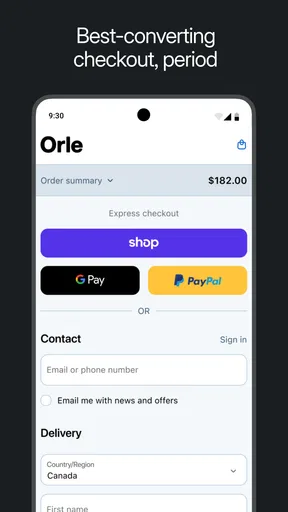
I would also test the customer journey before sharing the store publicly. Look at a product as if you have never seen it, check whether the important information is easy to find, and walk through the order process carefully. This catches a different class of problem than simply checking whether the product appears in the admin view. A store can look complete to its owner while still being unclear to a first-time buyer.
Another useful approach is to separate “must be correct” from “can improve later.” Product availability, fulfilment details, contact information, and pricing belong in the first group. Brand polish, long-form storytelling, and extensive collections can wait. This keeps the initial launch from turning into an endless design project.
What daily work feels like inside the app
Imagine a realistic Saturday for a small candle business. In the morning, I receive an online order and need to confirm what has sold. At midday, I take the same products to a local market. During the event, I want to avoid selling an item that was already promised online. Later, I return home, review the day’s orders, and decide which products need replenishing or a better description. The app’s usefulness comes from giving those moments a common place to manage.
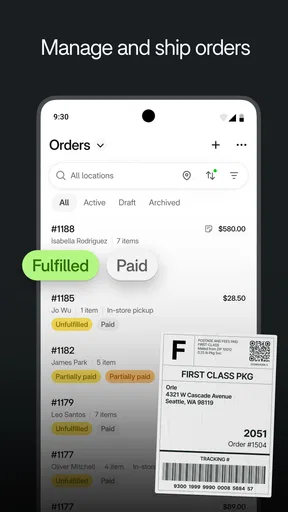
For online orders, the mobile view is valuable because I do not have to wait until I am back at a computer to understand what needs attention. I can review incoming activity while packing products or travelling between suppliers. That does not remove the need for careful fulfilment, but it reduces the delay between a customer action and my response.
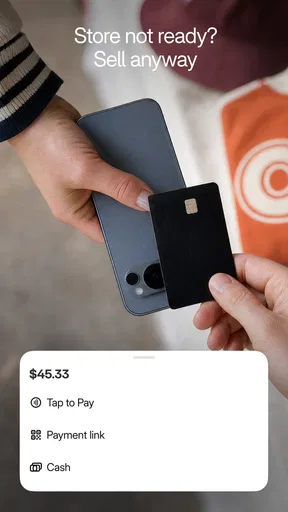
For in-person selling, the benefit is continuity. A physical sale should not feel like a completely separate business from an online sale. Keeping those activities within the same shop structure can make it easier to understand what is moving and what is sitting still. This is particularly helpful for sellers who alternate between an online storefront and pop-up events.
Customer work is another area where a central system can save time. When someone returns with a question about an order, I would rather look at the relevant history than search through messages, payment notifications, and handwritten notes. The app is most useful here when I make a habit of recording and checking information consistently instead of treating customer details as something to reconstruct later.
Marketing tasks can also be handled more deliberately when product information is already organised. Rather than promoting whatever comes to mind, I can look at the catalogue and choose a product that is available, properly described, and ready to fulfil. That small connection between promotion and operations is easy to overlook, but it prevents the awkward situation of attracting attention to something I cannot supply.
Small workflows that save more time than expected
One of the less obvious strengths is that the app encourages me to make decisions from the shop’s current state instead of from memory. Before creating a promotion, I can check whether the item is actually available. Before promising a delivery, I can review the order details. Before adding another product, I can ask whether the catalogue needs it or whether an existing listing simply needs improvement.
A second useful insight is to use mobile access for short, specific checks rather than trying to do every business task on a phone. I find it well suited to reviewing activity, making a quick product correction, or checking an order while away from a desk. Longer catalogue editing and detailed store planning can still be more comfortable on a larger screen. The app complements a desktop workflow; it does not make a desktop unnecessary for everyone.
A third is that AI works best as an editing assistant, not as an authority. If I provide a clear product idea and then revise the wording myself, it can reduce the blank-page problem. If I publish the first generated version without checking facts, it can create extra work later. The time saved comes from starting faster, not from skipping judgement.
A fourth is to use the shop as a source of operational truth. If stock is changed in one place but not another, the advantage of centralisation disappears. I would choose a regular moment to review product availability and order status, especially after an event or a busy sales period. This is not exciting work, but it is exactly the kind of routine that prevents avoidable customer conversations.
Where Shopify removes friction compared with simpler alternatives
A marketplace can be easier when I want immediate exposure to shoppers who are already browsing. A payment-only app can be quicker when I just need to accept money at a stall. A spreadsheet can be flexible and familiar. Shopify sits between those options and a full business system: it gives me a structured shop without requiring me to assemble every basic selling task from scratch.
That structure is its biggest advantage over a spreadsheet. A spreadsheet can record information, but it does not naturally turn that information into a customer-facing store and an order workflow. It also depends heavily on personal discipline. Shopify gives the work a more defined shape, which is helpful when the business is no longer operated by one person who remembers everything.
Compared with a marketplace, the main advantage is control over the shop experience and the relationship with the customer. The compromise is that I cannot simply rely on marketplace traffic. I have more responsibility for presentation, discovery, and bringing people to the store. Anyone expecting the app to supply an audience automatically may be disappointed.
Compared with a basic point-of-sale tool, Shopify makes more sense when online and in-person selling need to be considered together. If I only take occasional payments face to face, a simpler option may be faster to learn. If I am building a brand with repeat products, online orders, and ongoing catalogue work, the broader system is more worthwhile.
The app also removes a particular kind of friction: being away from the office. A seller can respond to business activity while travelling, attending an event, or handling stock. That mobility is not just convenience. For a small operation, waiting until the end of the day to discover an issue can mean a missed customer, a delayed order, or an inaccurate product listing.
What new users should understand before committing
The free price makes it easy to begin exploring, but I would not confuse free installation with a completely cost-free retail operation. Running a store involves choices about the wider Shopify service, selling channels, payment handling, fulfilment, and other business needs. Before committing seriously, I would map the workflow I actually need and check which parts fit the plan and tools I intend to use.
There is also a learning curve. The app tries to cover many areas, and that breadth can make the first few sessions feel busier than a narrow selling tool. I would expect to spend time understanding how products, orders, customers, and store content relate to one another. That effort pays off for a growing shop, but it may not be justified for someone selling one or two items once in a while.
Mobile management has practical limits too. I can handle urgent checks and many everyday changes from a phone, but detailed writing, image preparation, and large catalogue cleanups may feel cramped. A seller who expects the app to replace every desktop task could find the experience slower than expected. I see it as a strong companion for active management rather than a promise that every task is equally comfortable on a small screen.
AI-generated content deserves a separate warning because it can make weak information sound polished. Product claims, measurements, materials, care instructions, and delivery promises need human review. A beautifully written error is still an error, and customers will judge the shop by what arrives, not by how professional the description sounds.
The app is also not the right choice for every business model. A local service provider who does not sell products may need scheduling and customer relationship tools more than a product catalogue. A large company with complex internal processes may eventually require specialised systems and integrations beyond what a mobile shop manager is meant to handle. Shopify can grow with a business, but growth does not mean every business should force itself into the same workflow.
Who I would recommend it to
I would recommend Shopify to a maker, independent retailer, small brand, or side-business owner who wants online and in-person selling to feel like one operation. It is especially useful if orders are becoming frequent enough that memory and spreadsheets are no longer reliable. The ability to check the shop from a phone is a real advantage for anyone who does not spend the day at a desk.
I would also suggest it to someone who wants to start carefully rather than build a complicated store immediately. Beginning with a focused catalogue, using AI for first drafts, and improving the customer journey through real use is a sensible path. The platform gives room to develop, provided the owner is willing to maintain the underlying product and order information.
I would hesitate to recommend it to a casual seller who wants the quickest possible listing and payment. In that situation, a marketplace or lightweight payment app may involve less administration. I would also point cautious beginners toward a clear budget and workflow plan before they invest significant time, because the platform’s usefulness depends on the wider selling setup, not just the app download.
For device compatibility, the current version is 10.2634.0 and requires iOS 11 or later. The app is rated for Everyone, which fits its role as a general business tool rather than a service aimed at a restricted audience. Those practical details make it approachable for many shop owners, but the real question is still whether the business needs a connected commerce system.
My final view after using it as a shop manager
Shopify succeeds when I judge it by the recurring problem it is meant to solve: keeping selling activity organised while the owner is busy doing everything else. It can shorten the path from customer action to useful business response, especially when online orders, physical selling, product maintenance, and customer questions overlap.
Its weaknesses are the reverse side of that strength. Because it covers more than a simple listing or payment tool, it asks for more setup, more maintenance, and more thoughtful decisions. The app cannot replace accurate stock habits, careful fulfilment, or a plan for reaching customers. It gives those activities a shared structure; it does not perform the judgement for me.
Overall, I see it as a strong choice for a serious small seller who has outgrown disconnected tools but does not want to manage a sprawling technical setup. The free entry point makes experimentation reasonable, and the large installed base shows that it is not an obscure option. My recommendation is to start with a small, accurate catalogue, test the full buying journey, and use the mobile app for the decisions that genuinely need to happen during the day.
The best reason to choose Shopify is not that it promises to build a store instantly; it is that it can make the everyday work behind that store easier to keep together. If that is the problem I am facing, this app is worth serious consideration. If I only need an occasional sale, its broader structure may be unnecessary.
Privacy and Permissions
See what permissions an app requests and how it handles your data.
- Location
- approximate location (network-based), precise location (GPS and network-based)
- Phone
- read phone status and identity
- Camera
- take pictures and videos
- Microphone
- record audio
- Wi-Fi connection information
- view Wi-Fi connections
- Device ID & call information
- read phone status and identity
- Other
- view network connections, pair with Bluetooth devices, access Bluetooth settings, full network access, change your audio settings, control Near Field Communication, run at startup, control vibration, prevent device from sleeping
Verdict
Strengths of Shopify: Sell. Run a business.
- Easy setup for online stores without coding
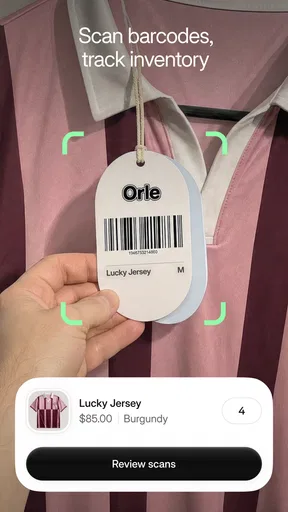
- Strong inventory, order, and product management tools
- Supports in-person sales with compatible POS hardware
- Large app marketplace for extending store functionality
- Reliable payment, shipping, and sales channel integrations
Limitations of Shopify: Sell. Run a business.
- Monthly subscription costs can become expensive as sales grow
- Many useful features require paid third-party apps
- Transaction fees may apply when using external payment providers
- Advanced customization often requires technical knowledge
- POS features and payment availability vary by country
Other Releases by Shopify Inc.
View All
Shop
Shopping4.4
Similar Picks in This Category
View All
LinkedIn: Community & Network
LinkedIn3.8

Zoom Workplace
zoom.com4.1

Microsoft Teams
Microsoft Corporation4.6

Meta Business Suite
Meta Platforms, Inc.4.6

Webex Meetings
Cisco Systems, Inc.4.5

TeamViewer Remote Control
TeamViewer4.4
Frequently Asked Questions
What is Shopify: Sell online/in person used for?
Shopify: Sell online/in person is a mobile companion for managing a Shopify store from an Android or iOS device. After signing in, you can review orders, add or edit products, communicate with customers, check sales performance, and manage parts of your storefront. It is designed for merchants who want to keep track of daily operations without relying entirely on a desktop computer.
Can I create and manage an online store entirely from the Shopify app?
The app lets you handle many important store tasks, including product updates, inventory checks, order fulfillment, discounts, customer information, and basic store settings. However, some advanced design, theme customization, reporting, and administrative features may be easier or only available through Shopify’s web dashboard. Your exact access depends on your Shopify plan, staff permissions, installed apps, and store configuration.
Does Shopify: Sell online/in person support physical store sales?
Yes. Shopify’s mobile experience can work with Shopify Point of Sale, allowing eligible merchants to sell products in person, accept payments through supported hardware or payment methods, and manage orders and inventory alongside online sales. Availability varies by country, payment provider, hardware, and subscription plan. Before downloading, confirm that Shopify POS and its payment features are supported in your region.
Is Shopify: Sell online/in person free to download and use?
Downloading the app is generally free, but using Shopify to operate a store requires a Shopify subscription after any applicable trial period. Additional costs can include payment processing, transaction fees, POS hardware, shipping services, premium themes, and third-party applications. The final price depends on your plan and business setup, so review Shopify’s current pricing and billing terms before committing.
What permissions and account requirements does the Shopify app need?
You need an active Shopify account and appropriate staff permissions to use the app. Depending on the features you access, the app may request permission for notifications, camera use for scanning or product images, photos, and location-related services for certain retail functions. Only store owners or authorized staff should sign in, and enabling two-step authentication is recommended to help protect orders and customer data.
